Windows Registry Editor Version 5.00
[HKEY_LOCAL_MACHINE\SYSTEM\ControlSet001\services\TCPIP6\Parameters]
"DisabledComponents"=dword:000000ff
[HKEY_LOCAL_MACHINE\SYSTEM\ControlSet001\services\TCPIP6\Parameters]
"DisabledComponents"=dword:000000ff
asp.net 2.0 使用
在PostBack後網頁通常會回到最頂端的位置,下面三個方式可以讓單頁或整個Web或目錄PostBack後回到原來停留的位置.
1. Web.config
1 | //在<system.web></system.web>之間增加節點 |
2 | <pages maintainScrollPositionOnPostBack="true"></pages> |
2. .aspx
1 | <@page MaintainScrollPositionOnPostback="true" .......> |
3. .cs
1 | Page.MaintainScrollPositionOnPostBack = true; |
Function ContainsChtString(str) As Boolean |
02 | '檢查字串是否包含中文或全形字 |
03 | Dim i As Integer |
04 | Dim Rc As Boolean |
05 | Rc = False |
06 | For i = 1 To Len(str) |
07 | If Asc(Mid(str, i, 1)) < 0 Then |
08 | Rc = True |
09 | Exit For |
10 | End If |
11 | Next |
12 | ContainsChtString = Rc |
13 | End Function |
A potentially dangerous Request.Form value was detected from the client (ctl00$MainContent$txtCode="<code></code>").
在安装了Visual Studio 2010 Beta2之后,当页面输入框默认情况下输入“<”或者“>”的时候。按照访问策略,这将导致一些安全问题,诸如:跨站脚本攻击(cross-site scripting attack)。而这个问题的更准确描述则是,当你在安装了.NET Framework 4.0以上版本后,当你的应用程序以.NET Framework 4.0为框架版本,你的任意服务器请求,都将被进行服务器请求验证(ValidationRequest),这不仅包括ASP.NET,同时也包括Web Services等各种HTTP请求,不仅仅针对aspx页面,也针对HTTP Handler,HTTP Module等,因为这个验证(Valify)的过程,将会发生在BeginRequest事件之前。
基于以上原理,在ASP.NET之前的版本中,请求验证也是默认开通的,但是发生在页面级(aspx)的,并且只在请求执行的时候生效,因此,在旧的版本中,我们只需要按以下方式配置即可:
在页面级别(aspx中)设置
ValidateRequest="false"
或者
在全局级别(Web.config中)设置
<configuration>
<system.web>
<pages validateRequest="false">
但是,以上设置仅对ASP.NET4.0以上有效。在ASP.NET4.0版本上,我们需要更多一行的配置:
在全局级别(Web.config中)设置
<configuration>
<system.web>
<httpRuntime requestValidationMode="2.0">
这一点其实在发生错误的页面中已经有说明了。在实际使用过程中,不仅如此,而且我发现requestValidationMode只要设置成小于4.0就可以,比如:1.0,2.0,3.0,3.9都是可以的,错误提示中指明用2.0,目的只是说明用ASP.NET 2.0的默认方式进行工作。
I don’t remember how many times I was asked about an equivalent term of the infamous “NOLOCK” hint for mysql database server, hence I thought it was worth to write about it here. “WITH (NOLOCK)” is a transaction isolation levels that defines how data is available during an update, or with other words it is a property that defines at what point changes made by an update operation will become available in a row, table or database to other processes.
The official SQL standard defines four isolation levels:
READ COMMITTED
READ UNCOMMITTED
REPEATABLE READ
SERIALIZABLE
When WITH (NOLOCK) is used with SQL Server, the statement does not place a lock nor honor exclusive locks on table. The MySQL equivalent is READ UNCOMMITTED, also known as “dirty read” because it is the lowest level of isolation. If we specify a table hint then it will override the current default isolation level. MySQL default isolation level is REPEATABLE READ which means locks will be placed for each operation, but multiple connections can read data concurrently.
SQL Server WITH (NOLOCK) looks like this:
SELECT * FROM TABLE WITH (nolock)
To achieve the same with MySQL, we change the session isolation mode using the SET SESSIONcommand.
SET SESSION TRANSACTION ISOLATION LEVEL READ UNCOMMITTED ;
SELECT * FROM TABLE_NAME ;
SET SESSION TRANSACTION ISOLATION LEVEL REPEATABLE READ ;
This statement will work similar to WITH (NOLOCK) i.e READ UNCOMMITTED data. We can also set the isolation level for all connections globally:
SET GLOBAL TRANSACTION ISOLATION LEVEL READ UNCOMMITTED ;
In addition, two system variables related to isolation also level exist in MySQL server:
SELECT @@global.tx_isolation; (global isolation level)
SELECT @@tx_isolation; (session isolation level)
Or set the isolation level inside a transaction:
SET TRANSACTION ISOLATION LEVEL REPEATABLE READ
GO
引用:http://articles.itecsoftware.com/mysql/with-nolock-table-hint-equivalent-for-mysql
If you're getting...
"HTTP Error 404.17 - Not Found - The requested content appears to be script and will not be served by the static file handler."
...on Vista while trying to get PHP working under IIS7 with the standard ISAPI "php5isapi.dll" ask yourself, are you running 64-bit? That ISAPI DLL is a 32-bit DLL, so you'll have to either change your default Application Pool to enable 32-bit, or preferably create a separate 32-bit AppPool for your PHP Application.
Right click on the Application Pool and select "Advanced Settings" then "Enable 32-bit Applications."
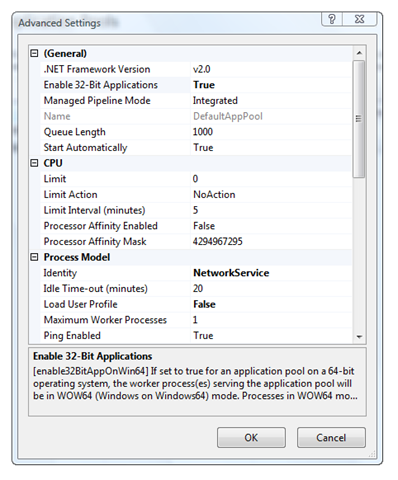
At this point, you're all set with the standard ISAPI PHP stuff.
%20-%20Windows%20Internet%20Explorer_2.png)
Even better, consider using the FastCGI for IIS component. I'll do a screencast on that soon.
前一陣子,因為突然停電的關係,電腦突然關機,再重新啟動後,進入 phpMyadmin 中時,就看到 plog 某些資料表在使用中,無法做更新,試圖修改時,會出現這樣的訊息:
Can't open file: 'xxx.MYI'. (errno: 144)
myisamchk -f xxx.MYI 就可以修復了。
xcopy 【源目录】【目标目录】/s /e /h
/s 复制非空的目录和子目录。如果省略 /s,xcopy 将在一个目录中工作。
/e 复制所有子目录,包括空目录。
/h 复制具有隐藏和系统文件属性的文件。默认情况下,xcopy 不复制隐藏或系统文件。
好吧!這一次真的是我太嫩了!短短接觸 .NET 平台雖然不到半年,我這次認栽了!
今天,就為了這小小的 Bug,不知道浪費多久的時間,殺死了多少的腦細胞!唉!只能說我還是太嫩了,寫的程式不夠多!還以為真的是七月,見到鬼了,一行一行 trace,明明眼看 TextBox 中有值,卻無法取用!幸好, Google 讓我搜尋到解答,早在 2005 的時候,就有人提出解決辦法了!Orz
解決之道:

 瀏覽 (2)